Choosing the Right Open Source License: A Guide for Developers
So, you’ve just built an awesome open source project. Maybe it’s a slick new JavaScript library, a game-changing CLI tool, or even the next big framework. But hold on—before you hit “publish,” there’s one critical question to answer: What license should you use?
Picking the right open source license isn’t just a formality. It’s a decision that shapes how others can use, modify, and share your work. Choose wrong, and you might accidentally limit your project’s growth, alienate contributors, or even expose yourself to legal risks. Let’s break down how to navigate this maze without losing your sanity.
What Even Is an Open Source License?
An open source license is a legal agreement that dictates how your software can be used, modified, and distributed. Without one, your code isn’t truly “open source”—it’s just publicly available code, which others might hesitate to touch (because, well, lawyers).
The Open Source Initiative (OSI) maintains a list of approved licenses that meet the Open Source Definition. Sticking to these ensures your project aligns with community standards. But with over 80 OSI-approved licenses out there, how do you choose? Let’s simplify.
Permissive vs. Copyleft: The Great Divide
Most licenses fall into two camps: permissive or copyleft. Here’s the TL;DR:
-
Permissive Licenses (MIT, Apache, BSD):
- “Do whatever you want, but mention me.”
- Minimal restrictions. Users can modify your code and keep changes private, even in commercial products.
-
Copyleft Licenses (GPL, AGPL):
- “Share-alike” ethos. If someone uses your code, their derivative work must also be open source.
Still fuzzy? Let’s compare popular licenses side-by-side:
| License | Type | Key Feature | Best For |
|---|---|---|---|
| MIT | Permissive | Minimal restrictions; attribution required | Projects aiming for maximum adoption |
| Apache 2.0 | Permissive | Adds patent protections | Corporate-friendly projects |
| GPL-3.0 | Copyleft | Derivatives must be open source | Protecting code freedom (e.g., Linux kernel) |
| LGPL-3.0 | Weak Copyleft | Links to libs allowed in proprietary code | Libraries used in closed-source software |
| AGPL-3.0 | Strong Copyleft | Extends GPL to SaaS/network use | Preventing cloud providers from monetizing |
Key Considerations Before You Commit
1. What’s Your Goal?
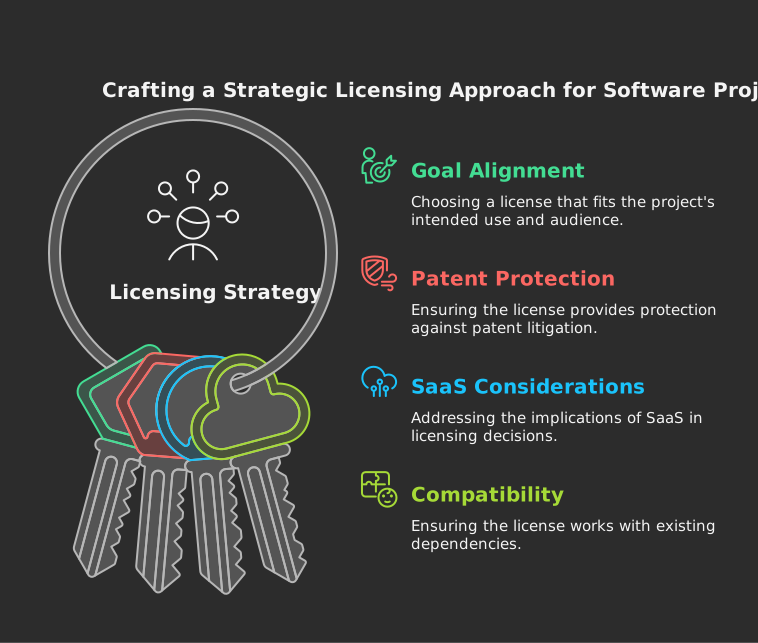
Are you building a community-driven project or a tool you want businesses to adopt? Permissive licenses like MIT or Apache 2.0 are magnets for adoption because companies can use your code without legal headaches. But if you’re passionate about keeping derivatives open (think: Linux), copyleft licenses like GPL enforce that ethos.
2. Patents Matter
The Apache 2.0 License includes explicit patent grants, protecting users from patent trolls. If your project is in a patent-heavy field (AI, cloud infra), this adds a layer of safety.
3. The “SaaS Loophole”
Traditional copyleft licenses like GPL don’t cover software-as-a-service (SaaS). If you want to prevent companies from profiting off your code without contributing back (looking at you, cloud giants), the AGPL closes that gap by requiring SaaS providers to open their modifications.
4. Dependencies and Compatibility
Your license must play nice with your project’s dependencies. For example, GPL-licensed code can’t be used in MIT projects, but MIT code can be included in GPL projects. Tools like Choose a License or GitHub’s License Picker simplify this.
The Hidden Implications of Your Choice
Community Impact
Permissive licenses attract more contributors because they’re low-friction. Developers and companies can experiment freely. But copyleft licenses foster a “give back” culture, ensuring improvements stay public.
Legal Risks
No license = no clarity. Without one, contributors might hesitate to engage. Conversely, using a niche or non-OSI-approved license (looking at you, JSON License) can create compatibility nightmares.
Business Friendliness
Big Tech loves permissive licenses. Google’s Go, Facebook’s React (initially BSD/MIT), and Microsoft’s VS Code (MIT) thrive because enterprises can adopt them risk-free. But if your goal is to prevent commercialization, copyleft is your ally.
How to Choose: A Step-by-Step Checklist
- Define Your Priorities: Adoption vs. control?
- Audit Dependencies: Ensure compatibility.
- Consider Contributors: Will a strict license deter them?
- Plan for the Future: Can you relicense later? (Spoiler: It’s complicated.)
- Use a Helper Tool: ChooseALicense.com is gold.
Real-World Examples
- MIT License: React (before its controversial license switch in 2017), Rails
- Apache 2.0: Kubernetes, Android
- GPL-3.0: WordPress, Signal
- AGPL: MongoDB (before switching to SSPL), Nextcloud
What If You Change Your Mind Later?
Relicensing is possible but messy. You’ll need approval from all contributors, which is impractical for large projects. Some projects dual-license (e.g., MySQL under GPL and a commercial license), but this adds complexity.
Final Thoughts: It’s About Values
Choosing a license isn’t just legal paperwork — it’s a statement about what you value. Freedom? Collaboration? Control? There’s no one-size-fits-all answer, but understanding the trade-offs empowers you to make an informed choice.
When in doubt, start simple. The MIT License is the “default” for a reason: it’s lightweight, widely understood, and gets your code into as many hands as possible. But if your project’s success depends on keeping derivatives open, copyleft ensures your work stays free.
Either way, pick a license. Your future contributors (and lawyers) will thank you.
Got Questions? Send your questions, thoughts, and comments to my email! And if you’re still stuck, check out the Free Software Foundation’s License Guide for deeper insights.
If you liked my post you can read other posts on my blog.
Happy coding — and licensing! 🚀